

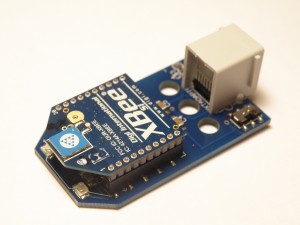
 This project presents a leJOS class to interface with the NXTBee, along with some sample Java code in leJOS showing how to send and receive data. I’ve written extensively about the Dexter Industries NXTBee sensor before. The NXTBee provides long-range serial wireless communication for the Lego Mindstorms NXT.
In my previous project I developed a RobotC type-packing library to send and receive basic data types between NXTs and PCs using the NXTBee.
The NXTBee class wraps the serial interface to the NXTBee with high-level Java primitives. The class contains a thread that runs in the background to send and receive data to and from the NXTBee. The thread uses two circular byte buffers (one for sending, one for receiving data) to hold data until the caller is ready to process it. All of this detail is hidden behind a Java Input/Output Stream interface, which is the default Java interface for reading and writing data values.
The NXTBee class also provides a direct command control method that turns off the data reading thread and allows you to re-configure the NXTBee. For example, you can use this method to change the baud rate of the NXTBee, change the device address and so on.
The JavaDoc methods for the class is shown below.
You can download the class file, and I’ve also included three test programs to send and receive data, and to adjust the baud rate of the NXTBee. These classes are also in the latest SVN snapshot for leJOS and will be part of the next official release of leJOS.
- NXTBee.java - the core NXTBee driver class in the lejos.nxt.addon package.
- CircularByteBuffer.java - a circular byte buffer implementation from the Ostermiller java utilities.
- NXTBeeBaud.java - allows you to change the baud rate of the NXTBee sensor.
- NXTBeeSend.java - sends basic data over the NXTBee, with no error detection or checksum. You will need to build a type-packing library on top of this class.
- NXTBeeReceive.java - receive basic types sent by NXTBeeSend (or from another XBee device).
lejos.nxt.addon
Class NXTBee
java.lang.Object
  lejos.nxt.addon.NXTBee
- All Implemented Interfaces:
- Runnable
Send and receive data using a Dexter Industries NXTBee attached to Port 4 The NXTBee uses a RS485 serial link. By default it operates at 9600 baud, but this can be changed For more details on the NXTBee see: http://www.dexterindustries.com/NXTBee.html, The NXTBee class has two modes of operation; by default a thread can be started by calling the NXTBee nb = new NXTBee(); new Thread(nb).start(); The thread will act as a data pump continually polling the RS485 port and storing data received on the port in an internal circular buffer, and reading data from the circular buffer and writing it onto the RS485 port. Direct read/write access to the RS485 port is supported by calling the stop() and statrt() methods which pause the internal data reading thread. The NXTBee class returns an InputStream and an OutputStream object which can be used by programs to read and write data to and from the NXTBee. Use of the Stream objects is recommended over direct access to the RS485 port. For example, the standard DataInputStream/DataOutputStream classes provide a clean interface for reading/writing basic Java types. The NXTBee configuration is changed by entering a dedicated command mode by sending the sequence +++ with a one second pause before and after the +++ characters. In this mode the configuration of the NXTBee can be changed. To exit the command mode the sequence ATCN\n is sent. Portions of this class use code from Stephen Ostermiller's Java utilities: http://ostermiller.org/utils/CircularBuffer.html
- Version:
- 0.1
- Author:
- Mark Crosbie ([email protected]), http://mastincrosbie.com/Marks_LEGO_projects/LEGO_Projects.html
| Nested Class Summary | |
|---|---|
protected class |
NXTBee.NXTBeeInputStream
Class for reading from the NXTBee, returns a standard Java InputStream that can be used as an input source Based on CircularByteBuffer from Ostermiller Java utils. |
protected class |
NXTBee.NXTBeeOutputStream
Class for writing to a circular byte buffer. |
| Field Summary | |
|---|---|
protected boolean |
inputStreamClosed
|
protected boolean |
outputStreamClosed
|
| Constructor Summary | |
|---|---|
NXTBee()
Default constructor initialises a NXTBee object at 9600 baud Enables the internal data reading thread |
|
NXTBee(boolean runThread)
Constuctor for the NXTBee running at default 9600 baud. |
|
NXTBee(int baud)
Constructor to create a NXTBee object at a specified baud rate |
|
NXTBee(int baud,
       boolean runThread,
       boolean debugEnabled)
Constructor to create a NXTBee object to communicate at a specified baud rate and to select if the internal data reading thread is running. |
|
| Method Summary | |
|---|---|
boolean |
enterCommandMode()
Force the NXTBee to go into a direct command mode. |
boolean |
exitCommandMode()
Force the NXTBee to exit direct command mode. |
InputStream |
getInputStream()
Return an Input stream for receiving data from the NXTBee |
OutputStream |
getOutputStream()
Return an Output stream for writing to the NXTBee |
int |
read(byte[] b,
     int off,
     int len)
Read bytes directly from the NXTBee RS485 buffer to get data if available Bypasses the internal circular buffer. |
void |
resetNXTBee()
Reset the NXTBee to the default configuration See the NXTBee documentation for more details. |
void |
run()
When an object implementing interface Runnable is used
to create a thread, starting the thread causes the object's
run method to be called in that separately executing
thread. |
void |
saveConfiguration()
Save the configuration on the device into FLASH so that it survives a power cycle See the NXTBee documentation for more details. |
boolean |
setNXTBeeBaudrate(int baud)
Set the baud rate used by the NXTBee. |
boolean |
setPinmode()
Set the D7 pin to the correct mode |
void |
start()
Start the internal data reading thread, The data reading thread acts as a data pump to an internal circular buffer, filling the buffer with data received from the RS485 port, and sending data on the port when the buffer is filled. |
void |
stop()
Stop the internal data reading thread, allowing direct access to the underlying sensor on port 4 The data reading thread acts as a data pump to an internal circular buffer, filling the buffer with data received from the RS485 port, and sending data on the port when the buffer is filled. |
int |
write(byte[] b,
      int offset,
      int len)
Write bytes directly to the RS485 port for transmission by the NXTBee Bypasses the internal circular buffer. |
| Methods inherited from class java.lang.Object |
|---|
clone, equals, finalize, getClass, hashCode, notify, notifyAll, toString, wait, wait, wait |
| Field Detail |
|---|
outputStreamClosed
protected boolean outputStreamClosed
inputStreamClosed
protected boolean inputStreamClosed
| Constructor Detail |
|---|
NXTBee
public NXTBee()
- Default constructor initialises a NXTBee object at 9600 baud
Enables the internal data reading thread
NXTBee
public NXTBee(boolean runThread)
- Constuctor for the NXTBee running at default 9600 baud.
- Parameters:
runThread- If true the internal data reading thread is started, if false the thread does not read/write data and all data transfer must be performed manually using the read/write methods.
NXTBee
public NXTBee(int baud,
              boolean runThread,
              boolean debugEnabled)
- Constructor to create a NXTBee object to communicate at a specified baud rate
and to select if the internal data reading thread is running.
- Parameters:
baud- - baud rate to select when communicating with the NXTBee.runThread- If true the internal data reading thread is started, if false the thread does not read/write data and all data transfer must be performed manually using the read/write methods.debugEnabled- If true then debug output is written to RConsole. Can be disabled using the setDebug call. You must open RConsole to get any output on it first.
NXTBee
public NXTBee(int baud)
- Constructor to create a NXTBee object at a specified baud rate
- Parameters:
baud- Baud rate used to communicate with the NXTBee on port 4
| Method Detail |
|---|
getInputStream
public InputStream getInputStream()
- Return an Input stream for receiving data from the NXTBee
- Returns:
- an input stream for the NXTBee
getOutputStream
public OutputStream getOutputStream()
- Return an Output stream for writing to the NXTBee
- Returns:
- an output stream for the NXTBee
stop
public void stop()
- Stop the internal data reading thread, allowing direct access to the underlying sensor on port 4
The data reading thread acts as a data pump to an internal circular buffer, filling the buffer
with data received from the RS485 port, and sending data on the port when the buffer is filled.
If you want to communicate directly with the NXTBee then call the stop() method to halt the buffer
thread. Call start() to re-start the data reading thread.
The contents of the circular data buffer are unaffected by calling start() and stop()
start
public void start()
- Start the internal data reading thread,
The data reading thread acts as a data pump to an internal circular buffer, filling the buffer
with data received from the RS485 port, and sending data on the port when the buffer is filled.
If you want to communicate directly with the NXTBee then call the stop() method to halt the buffer
thread. Call start() to re-start the data reading thread.
The contents of the circular data buffer are unaffected by calling start() and stop()
read
public int read(byte[] b,
                int off,
                int len)
- Read bytes directly from the NXTBee RS485 buffer to get data if available
Bypasses the internal circular buffer. It is not recommend to call this method
if the internal data reading thread is running. The recommended method of calling
is to first call stop(), then read(), then start() so as to avoid collisions
between the data reading thread and this method.
- Parameters:
b- - byte buffer to place the data intooff- - the offset in b to start storing data read into.len- - the number of bytes to read. The contract of read is to read anywhere from 0 up to len bytes and store them in b[off]..b[off+len-1].- Returns:
- The number of bytes read
write
public int write(byte[] b,
                 int offset,
                 int len)
- Write bytes directly to the RS485 port for transmission by the NXTBee
Bypasses the internal circular buffer. It is not recommend to call this method
if the internal data reading thread is running. The recommended method of calling
is to first call stop(), then write(), then start() so as to avoid collisions
between the data reading thread and this method.
- Parameters:
b- - the byte buffer to write data fromoffset- - start writing bytes from the byte buffer at b[offset]len- - write len bytes from b[offset] to the RS485 port- Returns:
- The number of bytes written
run
public void run()
- Description copied from interface:
Runnable - When an object implementing interface
Runnableis used to create a thread, starting the thread causes the object'srunmethod to be called in that separately executing thread.
enterCommandMode
public boolean enterCommandMode()
- Force the NXTBee to go into a direct command mode. This mode bypasses the usual data exchange
and allows the configuration of the NXTBee to be changed.
To enter command mode the sequence +++ must be sent with a one-second guard on either side of
the bytes. Once in command mode the NXTBee will not forward data received on the wireless antenna.
To exit command mode call exitCommandMode().
Commands can be sent to the NXTBee using the write() method, or by calling hsWrite directly.
The contents of the circular buffer are not read/written to the RS485 port while in command mode.
However data can still be stored in the circular buffer for future transmission when command mode
is exited.
- Returns:
- A boolean true if command mode entered successfully, else false
exitCommandMode
public boolean exitCommandMode()
- Force the NXTBee to exit direct command mode. This mode reverts the NXTBee to normal operation
where data sent and received on the RS485 port is transmitted over the wireless link.
The character sequence to exit command mode is ATCN\n. If a OK reply is received then command
mode is disabled and normal data reading resumes. If no OK is received then data reading/writing
is not enabled and the NXTBee remains in command mode.
saveConfiguration
public void saveConfiguration()
- Save the configuration on the device into FLASH so that it survives a power cycle
See the NXTBee documentation for more details.
You must call enterCommandMode() prior to calling this function.
resetNXTBee
public void resetNXTBee()
- Reset the NXTBee to the default configuration
See the NXTBee documentation for more details.
You must call enterCommandMode() prior to calling this function
setPinmode
public boolean setPinmode()
- Set the D7 pin to the correct mode
- Returns:
- True if the pin mode was set, else false
setNXTBeeBaudrate
public boolean setNXTBeeBaudrate(int baud)
- Set the baud rate used by the NXTBee. This command will change the baud rate the NXTBee
communicates at, so you will have to reset the baud rate that leJOS for the RS485 port
by calling RS485.hsEnable()
Supported baud rates are: 1200, 2400, 4800, 9600 (default), 19200, 38400, 57600, 115200
If a baud rate is selected that is not one of these values then no change is made to
the baud rate of the NXTBee.
- Parameters:
baud- The baud rate to set the the NXTBee to use. Can only be one of the values above- Returns:
- True if the baud rate was set, else false
Ariel Ephrat
Oct 24, 2012 @ 17:05:40
Hi Mark,
I’ve been trying to use your above classes to get 2 NXTs to communicate with each other using NXTBees. I used your code exactly as is, without changing anything, and nothing seems to work. The “power” light goes on, and the screens show what they are initially supposed to, however the “receive” light never goes on, and the receiving NXT never shows anything.
Is there some sort of initialization or configuration that needs to be done?
This is for an advanced university project, and I’d really appreciate any help you can give me.
Thanks,
Ariel