In my last post I shared how to get a working version of leJOS running on your wifi-enabled EV3. Now we need to make it do something, so in this tutorial I will cover the basic tools for compiling, uploading and executing leJOS Java programs on the EV3.
Get the leJOS source
Andy has uploaded the current working source code for leJOS into a Github repository. The repository lives at http://sourceforge.net/p/lejos/ev3/ci/master/tree/. You can browse the repository in your web browser to view individual files, but if you want to work with the examples and build new code it is best to use the git command to check out a local copy of the repo:
|
1 |
git clone git://git.code.sf.net/p/lejos/ev3 lejos-ev3 |
Alternatively you can download a zip file of the current snapshot from Github by clicking on the Download Snapshot link at the top of the frame:

When you unpack the snapshot tarball, or run the git clone command, you’ll end up with the leJOS EV3 class files and sample programs in a directory named lejos-ev3.
Basic Tools
To compile Java programs for the EV3 you will need…Java! The version that is installed on my Mac is Java 1.6:
|
1 2 3 4 |
$ java -version java version "1.6.0_51" Java(TM) SE Runtime Environment (build 1.6.0_51-b11-457-11M4509) Java HotSpot(TM) 64-Bit Server VM (build 20.51-b01-457, mixed mode) |
The beauty of Java is that it compiles code to bytecode, and that bytecode can run on almost any platform. It is easy to compile your Java code on one platform (a Mac, Linux or Windows box) and then run it on another (the EV3). Download the latest Java JDK for your platform from the Oracle website.
To get data to and from the EV3 you will need an ssh program. The Linux version running on the EV3 runs a copy of the Dropbear ssh server. Dropbear is optimised to run on embedded platforms, but supports all of the standard ssh protocol commands to login into the terminal and copy files. ssh is installed by default on Mac OS and Linux systems. For Windows you will need to download the amazing PuTTY terminal emulator that provides ssh support.
Let’s log into our EV3 and get to a command prompt (doing this for the first time is the most exciting bit!):
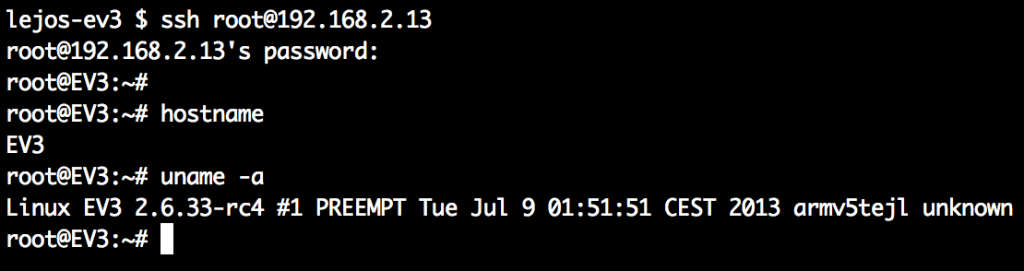
There is no password set for root, so just hit enter when prompted for the password at login. As you can see the EV3 is running a Linux ARM build.
Compiling HelloWorld
Let’s turn our attention back to our host PC where we previously downloaded the Github image of the EV3 leJOS source. We will start by compiling the classic HelloWorld program that Andy has provided and then we will upload the resulting class file to the EV3 where we can run it.
Change to the directory lejos-ev3 containing the source code and let’s look at the EV3HelloWorld.java file:
|
1 2 3 4 5 6 7 8 9 10 11 12 13 14 15 16 17 18 19 20 21 22 23 24 25 26 27 28 29 30 31 32 33 34 35 36 37 38 |
src $ pwd /Users/mcrosbie/lejos-ev3/EV3HelloWorld/src src $ cat EV3HelloWorld.java import javax.microedition.lcdui.Font; import javax.microedition.lcdui.Graphics; import lejos.nxt.LCD; import lejos.nxt.Button; import lejos.nxt.Sound; import lejos.util.Delay; public class EV3HelloWorld { /** * @param args */ public static void main(String[] args) { System.out.println("Running..."); final int SW = LCD.SCREEN_WIDTH; final int SH = LCD.SCREEN_HEIGHT; Button.LEDPattern(4); Sound.beepSequenceUp(); Graphics g = new Graphics(); g.setFont(Font.getLargeFont()); g.drawString("leJOS/EV3", SW/2, SH/2, Graphics.BASELINE|Graphics.HCENTER); Button.LEDPattern(3); Delay.msDelay(4000); Button.LEDPattern(5); g.clear(); LCD.refresh(); Sound.beepSequence(); Delay.msDelay(500); Button.LEDPattern(0); } } |
Next we will compile this with Java. The key step here is to provide Java a pointer to the ev3classes.jar file which contain the EV3-specific leJOS code:

As you can see we now have a EV3HelloWorld.class file ready to upload to the EV3.
Uploading to the EV3
To copy our class file onto the EV3 we use the scp command provided by the ssh toolset:
|
1 2 |
src $ scp EV3HelloWorld.class root@192.168.2.13:/lejos/samples Coming soon: how to set up an NFS server on your EV3... |
Running the Java class file on the EV3
To run the Java file on the EV3 we use the jrun command that Andy has provided:
|
1 |
root@EV3:/lejos/samples# jrun EV3HelloWorld |
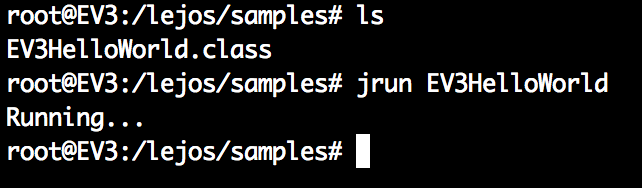
After a short delay to start the Java interpreter your EV3 should make a series of beeps upwards, display leJOS/EV3 on the screen and then a sequence of beeps downwards. Success!
Stay tuned for more tutorials on programming the EV3 in leJOS…
Nov 01, 2013 @ 11:41:02
Hi,
how i can use this with java editor. I dont know, how can use the new sensor´s. How i can import the new classes?
Nov 04, 2013 @ 15:37:46
I am sorry, but I can’t get it to work.
The package obtained from [git clone git://git.code.sf.net/p/lejos/ev3 lejos-ev3] does not contain any file ev3classes.jar. When I obtain that file from lejosimage.bz2) (https://sourceforge.net/projects/lejos/files/lejos-EV3/), I get all compiation errors:
EV3HelloWorld.java:4: package lejos.hardware does not exist
import lejos.hardware.Button;
^
EV3HelloWorld.java:5: package lejos.hardware does not exist
import lejos.hardware.LCD;
^
EV3HelloWorld.java:6: package lejos.hardware does not exist
import lejos.hardware.Sound;
^
EV3HelloWorld.java:7: package lejos.utility does not exist
import lejos.utility.Delay;
^
EV3HelloWorld.java:17: cannot find symbol
symbol : variable LCD
location: class EV3HelloWorld
final int SW = LCD.SCREEN_WIDTH;
^
EV3HelloWorld.java:18: cannot find symbol
symbol : variable LCD
location: class EV3HelloWorld
final int SH = LCD.SCREEN_HEIGHT;
^
EV3HelloWorld.java:19: cannot find symbol
symbol : variable Button
location: class EV3HelloWorld
Button.LEDPattern(4);
^
EV3HelloWorld.java:20: cannot find symbol
symbol : variable Sound
location: class EV3HelloWorld
Sound.beepSequenceUp();
^
EV3HelloWorld.java:24: cannot find symbol
symbol : variable Button
location: class EV3HelloWorld
Button.LEDPattern(3);
^
EV3HelloWorld.java:25: cannot find symbol
symbol : variable Delay
location: class EV3HelloWorld
Delay.msDelay(4000);
^
EV3HelloWorld.java:26: cannot find symbol
symbol : variable Button
location: class EV3HelloWorld
Button.LEDPattern(5);
^
EV3HelloWorld.java:28: cannot find symbol
symbol : variable LCD
location: class EV3HelloWorld
LCD.refresh();
^
EV3HelloWorld.java:29: cannot find symbol
symbol : variable Sound
location: class EV3HelloWorld
Sound.beepSequence();
^
EV3HelloWorld.java:30: cannot find symbol
symbol : variable Delay
location: class EV3HelloWorld
Delay.msDelay(500);
^
EV3HelloWorld.java:31: cannot find symbol
symbol : variable Button
location: class EV3HelloWorld
Button.LEDPattern(0);
^
15 errors
Where should I obtain the right ev3classes.jar, or what should I change in the source file EV3HelloWorld.java to fix this?
I tried the Eclipse method too, but I have no Linux Eclipse, only Windows, and I can’t get that to work either (not the right JRE target files for the ARM platform that are suitable for Eclipse@Windows).
Could you please provide me some help to get going?
Thanks in advance,
JG
Nov 09, 2013 @ 04:54:51
I have the same problem as you did you find out anything yet?
Nov 05, 2013 @ 10:54:29
Does compiling the EV3Helloworld works on mac too? I get error when I try to run javac to compile it, it says that package lejos.hardware does not exist! Can you help me please?
Nov 07, 2013 @ 02:07:03
Create posts, can the Java programs use the regular Java HTTP methods to call out to SOAP/REST services on the internet?
Sep 20, 2014 @ 18:33:05
Hey, Andy, fancy meeting you here 😉 Are you going to be showing off EV3 Force.com at Dreamforce?
Nov 09, 2014 @ 22:18:43
Stop wasting people’s time with this useless post!
Nov 19, 2014 @ 16:18:28
How would you suggest I improve it?